Why Can't I Edit My PDF? 6 Reasons and How to Fix Each
Why can't I edit my PDF? Pin down the cause in two minutes, from scans and permission passwords to flattened forms and signatures, then fix it step by step.

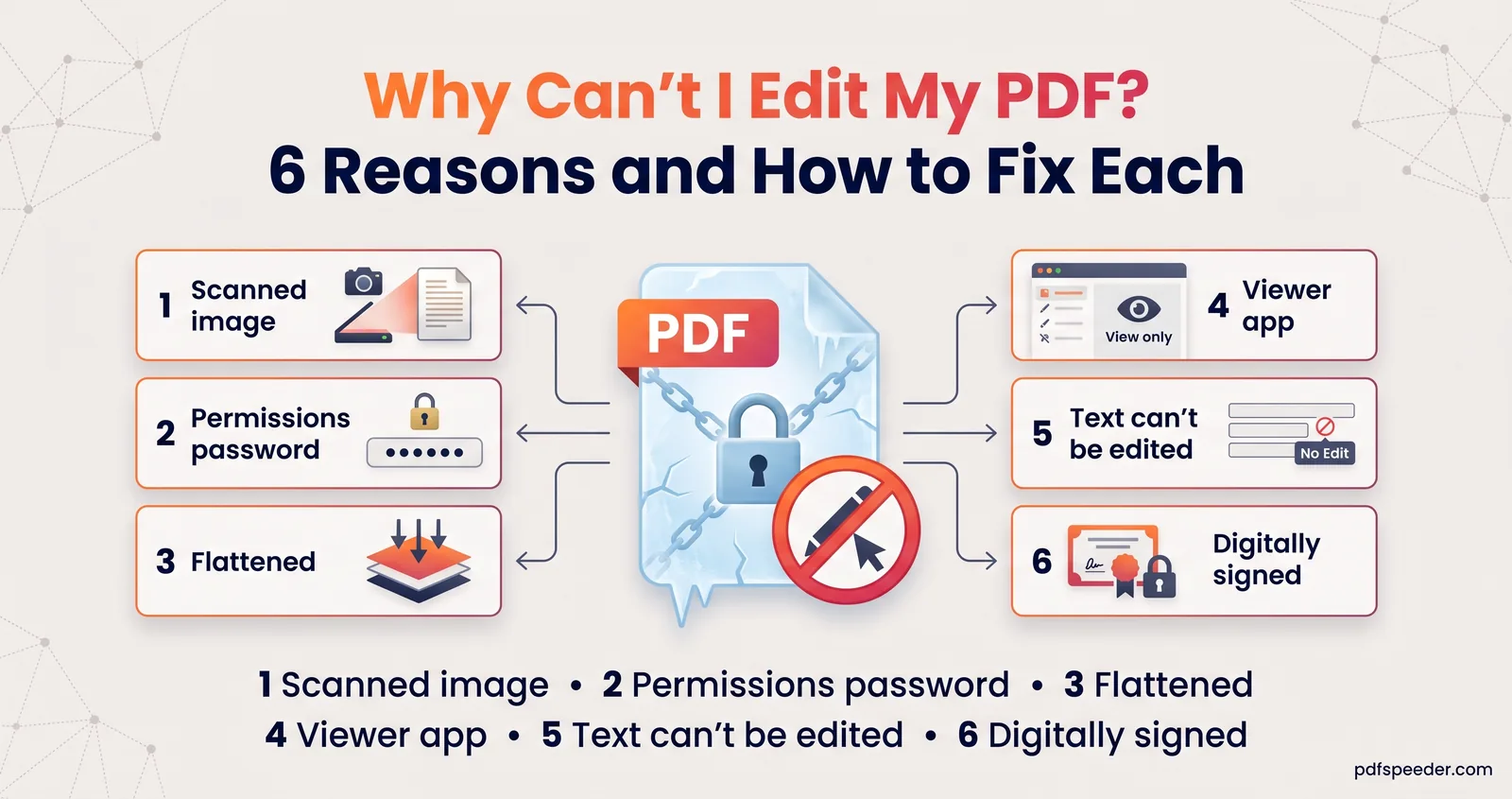
If you can't edit your PDF, it usually comes down to one of six things: the pages are scanned images, a permissions password blocks changes, a form was flattened, your app can only view PDFs, the text isn't stored as editable characters, or the file is digitally signed. Each one has a quick test and a fix, and most fixes take a couple of minutes. Start with the check below to find out why you can't edit your PDF, then jump to the matching section.
On this page
Why can't I edit my PDF? A two-minute check
Open the file in any PDF viewer, such as your browser, and try three things: select a line of text, search for a word you can see (Ctrl+F, or Cmd+F on a Mac), and zoom in to about 400%. What you notice points to the cause:
| What you notice | Likely reason | Fix |
|---|---|---|
| No text selects, and zoomed-in letters look fuzzy or blocky | 1. It's a scanned image | Run OCR |
| Text selects, but editing, printing or copying is blocked | 2. A permissions password | Remove the restrictions, if you're allowed to |
| Form boxes won't take typing, or old answers won't change | 3. The form was flattened | Type over it, or edit the answer as text |
| Your app has no tool for changing text | 4. It's a viewer, not an editor | Use an editor, or convert to Word |
| Letters stay sharp at 400% but won't select, or copy as gibberish | 5. The text isn't real text | OCR it, or retype it |
| A banner or panel says the document is signed | 6. It's digitally signed | Ask for an editable copy |
Reason 1: It's a scanned image
A scan or a phone photo saved as a PDF is a picture of paper. There are no characters in it to change, which is why the file says "PDF" but behaves like a JPG.
Quick test: you can't select or search any text, not even the title, and the letters go soft and blocky when you zoom in.
Fix: give it a text layer with OCR (optical character recognition). How you do it depends on what you need:
- To change a few words, open PDF Editor, choose Edit PDF and select Run OCR. It recognises the English words on the current page in your browser, and you click a word to replace it.
- To make the scan searchable, use PDF to OCR. It runs in your browser, handles files up to 100 MB and recognises 40 languages, including Hindi, Tamil and Bengali.
- To rewrite whole sections, convert the scan with PDF to Word and its OCR setting, edit the document, and save it as a PDF again.
Our explainer on what OCR is shows why a clean, straight, 300 DPI scan gives far better results than a skewed phone photo.
Reason 2: It has a permissions password
Some PDFs open without a password but carry a second, "permissions" password that tells viewers to block editing, copying or printing. People also call this an owner password, and it's the usual reason you cannot edit a PDF that opens normally.
Quick test: text selects, but the edit, copy or print options are greyed out. In Adobe Acrobat Reader, File > Properties > Security lists the restrictions; Acrobat may also add "SECURED" to the window title.
Fix: if the document is yours, or you're authorised to edit it, open Unlock PDF. It checks the file in your browser, and for a restrictions-only file the button reads Remove restrictions, with no password needed. You get a copy with "_unlocked" added to its name and the text, pages and links intact. If the file asks for a password just to open it, you'll need that password; there's no legitimate way around it.
Reason 3: The form or comments were flattened
Flattening merges form answers, comments and stamps into the page itself. It's done on purpose, so nobody can change answers after submission, but it also means the boxes stop being boxes.
Quick test: you click inside a form box and nothing happens, or a comment that used to be movable is now fixed to the page. If the boxes were never fillable in the first place, you'll see exactly the same thing.
Fix: it depends on what you need to change:
- An empty box: type over it. PDF Form Filler's manual mode lets you click anywhere and type, which works on flattened and never-fillable forms alike.
- An answer that's already there: a flattened answer usually becomes ordinary page text, so PDF Editor's Edit PDF mode can replace it like any other printed text.
- A lot of answers: ask whoever sent the form for a fresh, fillable copy. Editing a submitted form can also defeat the purpose of flattening it.
Reason 4: Your app is a viewer, not an editor
Most apps that open PDFs are built to display them. Browser viewers and phone apps can usually highlight, draw and add text boxes, but they can't change words already on the page. Apple says plainly in its guide to annotating PDFs in Preview that you can't edit the text of a PDF in Preview, only add markup on top.
Quick test: look for a tool that edits existing text. If all you can find is a pen, a highlighter and an "Add text" button, you're in a viewer.
Fix: use an editor with an edit-text mode. PDF Editor's Edit PDF button reads the page's text and lets you click a line and retype it, in your browser and for free; our guide to editing existing text in a PDF explains how to match the font and keep replacements tidy. For long rewrites, convert to Word instead, because a PDF doesn't reflow text when a sentence gets longer.
Reason 5: The text itself can't be edited
Sometimes text looks perfectly normal but isn't stored as characters at all. There are three common versions:
- Outlined text. Designers and printers often convert text to shapes, so it prints exactly right on any machine. It stays razor-sharp at any zoom, but you can't select it.
- Text inside an image. Logos, screenshots and pasted charts carry words as pixels.
- A broken character map. The text selects, but when you copy and paste it, you get gibberish or the wrong letters, because the font doesn't say which character each shape stands for.
Quick test: zoom in to 400%. Sharp letters that won't select point to outlines or a vector image; selectable text that pastes as nonsense points to a broken character map.
Fix: treat it like a scan. PDF Editor's Run OCR works from what the page looks like, so it can read outlined text too. For a whole document with a broken character map, convert it with PDF to Word and set OCR to Always, so the converter reads the page image instead of the faulty text. For a logo or designed heading, editing the original design file is usually the only clean route.
Reason 6: It's digitally signed
A digital signature, the certificate-based kind used on many official documents, seals the exact contents of the file. Some apps refuse to edit a signed or certified document, and any tool that does change it breaks the signature, so the file no longer proves it's genuine.
Quick test: your PDF reader shows a banner or a signature panel saying the document is signed, often with the signer's name and the date.
Fix: don't edit the signed copy. Ask the sender for an editable version, or for a corrected, re-signed document, and keep the original as your record. If you only need to add notes for yourself, work on a separate copy and expect its signature to show as invalid. Our guide to the difference between electronic and digital signatures explains what the signature protects.
Found your reason? For most PDFs that are not editable, the route is the same: unlock it if you're entitled to, run OCR if it's a scan, then make your change in PDF Editor and check the saved copy before you send it.
Frequently asked questions
How do I make a PDF editable?
Run OCR if it's a scan, remove any permissions password you're authorised to remove, and then edit it in a PDF editor's edit-text mode. For major rewrites, convert it to Word, edit, and save it as a PDF again.
Why is my PDF locked for editing?
It probably has a permissions password, which lets the file open but blocks editing, copying or printing. If the document is yours, Unlock PDF removes the restrictions without needing the password.
Can I edit a scanned PDF?
Yes, after OCR. PDF Editor's Run OCR recognises English words on a page so you can change them, and PDF to Word with OCR handles longer edits and other languages, including Hindi.
Why does PDF Editor say my page has no selectable text?
The page is probably a scan, or its words are drawn as shapes or sit inside a picture. Either way, Run OCR reads the words from what the page looks like so you can edit them.
Is it okay to remove editing restrictions from a PDF?
Only for documents you own or are authorised to change. If someone else restricted their document, ask them for an editable copy instead.