What Is Base64 Encoding? How It Works, With Examples
What Base64 encoding is and how it works: why Man becomes TWFu, why data grows by a third, padding, URL-safe Base64, data URIs, and why it isn't encryption.

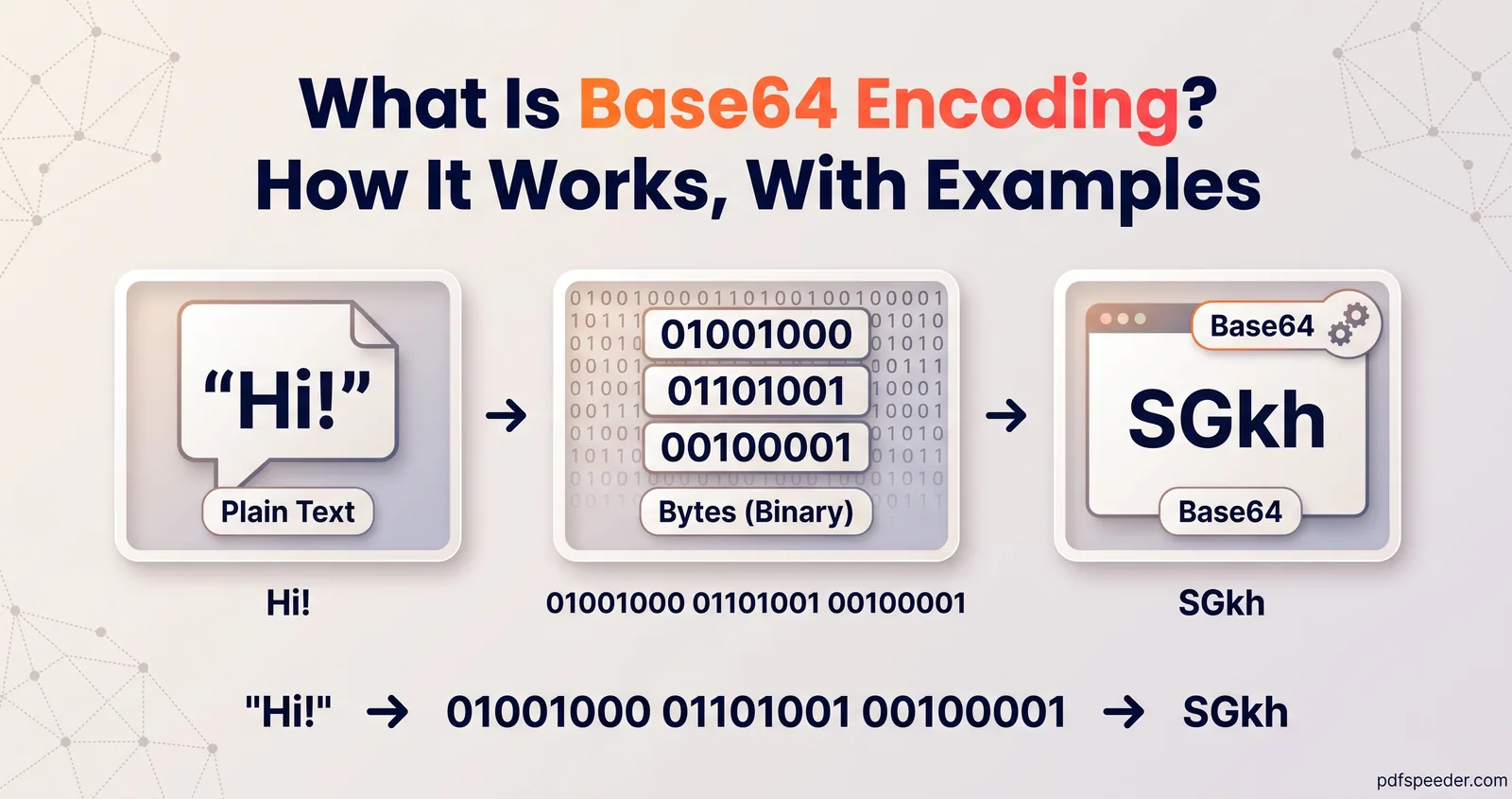
Base64 encoding is a way of writing any data, whether text, an image or a PDF, using only 64 safe characters: A to Z, a to z, 0 to 9, + and /. It turns every 3 bytes into 4 characters, so the word "Man" becomes "TWFu", and anything encoded comes out about a third bigger. It exists so binary data can travel through systems built for text, such as email, JSON and web pages, and it hides nothing: anyone can decode it.
On this page
Base64 in plain English
Computers store everything as bytes, numbers from 0 to 255. Many of those bytes are invisible control codes or characters with a special meaning, and systems designed for text, like email, JSON, XML and HTML attributes, can mangle or reject them.
Base64 solves that by rewriting the bytes in characters every text system handles safely. The standard behind it, RFC 4648, uses "a 65-character subset of US-ASCII": 64 characters for the data, plus "=" for padding.
You've probably met it already, perhaps without knowing:
- Email attachments are usually sent as Base64 text inside the message.
- Data URIs embed small images directly in HTML or CSS.
- APIs often carry files as Base64 strings inside JSON.
- Tokens and keys, such as JWTs and PEM certificates (the ones starting -----BEGIN CERTIFICATE-----), are Base64 underneath.
How Base64 encoding works: a worked example
Base64 reads the data in groups of 3 bytes (24 bits), splits each group into four 6-bit pieces, and turns each piece, a number from 0 to 63, into one character. Here's "Man":
- Bytes: M = 77, a = 97, n = 110
- In binary: 01001101 01100001 01101110
- Regrouped into 6 bits: 010011 010110 000101 101110, which are 19, 22, 5 and 46
- Looked up in the alphabet: 19 is T, 22 is W, 5 is F and 46 is u, giving TWFu
The alphabet is simply the characters in order:
| Values | Characters |
|---|---|
| 0 to 25 | A to Z |
| 26 to 51 | a to z |
| 52 to 61 | 0 to 9 |
| 62 and 63 | + and / |
Decoding runs the same steps backwards: each character becomes 6 bits again, and the bits are regrouped into bytes. Because Base64 works on bytes, text is turned into bytes first, normally with UTF-8. "₹100" is 6 bytes, because the rupee sign alone takes 3, and it encodes to 4oK5MTAw.
Why Base64 makes data about a third bigger
Every 3 bytes become 4 characters, so the output is 4/3 of the input, rounded up to a full group of 4:
encoded length = 4 × ceil(input bytes ÷ 3)
example: 100 bytes → 4 × ceil(33.3) = 4 × 34 = 136 characters| Input | Base64 output | Growth |
|---|---|---|
| 1 byte | 4 characters | 300% |
| 10 bytes | 16 characters | 60% |
| 100 bytes | 136 characters | 36% |
| 100 KB (102,400 bytes) | 136,536 characters | 33.3% |
| 1 MB (1,048,576 bytes) | 1,398,104 characters | 33.3% |
Short inputs grow most, because the last group is padded to 4 characters. Anything sizeable settles at a third bigger. Email adds a line break every 76 characters on top, which is why an attachment grows by about 37%; our guide to sending a PDF that's too large to email shows what that means for mailbox limits.
Padding, URL-safe Base64 and data URIs
Padding with =
When the input isn't a multiple of 3 bytes, the last group is short, and "=" fills the gap. RFC 4648 says a final group of 1 byte becomes two characters plus "==", and a final group of 2 bytes becomes three characters plus "=":
- "Man" (3 bytes) → TWFu
- "Ma" (2 bytes) → TWE=
- "M" (1 byte) → TQ==
The padding only tells the decoder how many bytes the last group holds, so it can be dropped when the length is known some other way.
URL-safe Base64
Two Base64 characters cause trouble in web addresses and file names: + and /. URL-safe Base64, defined in section 5 of RFC 4648, swaps them for - and _. The two bytes FB FF, for example, encode to +/8= in standard Base64 and to -_8 in the URL-safe form, with the padding dropped.
JSON Web Tokens use it. RFC 7515 defines their "Base64url" as the URL-safe alphabet with trailing "=" characters omitted and no line breaks. The usual token header, {"alg":"HS256","typ":"JWT"}, encodes to eyJhbGciOiJIUzI1NiIsInR5cCI6IkpXVCJ9, which is why so many tokens start with "eyJ".
Data URIs
A data URI puts a file's contents straight into a link, in the form data:[media type][;base64],data, for example data:image/png;base64,iVBORw0KGgo… The first few characters often tell you what's inside: every PNG's Base64 starts with iVBORw0KGgo, a JPEG's with /9j/ and a PDF's with JVBERi0.
To turn Base64 to an image, paste the string (with or without the data: prefix) into a decoder that can save bytes as a file. Inline images suit small icons. A 30 KB picture becomes 40 KB of text that can't be cached separately, so for anything larger, use a normal image file, and shrink it first with our Image Compressor, which works in your browser and can aim for a target size.
Is Base64 encryption? No
Base64 is encoding, not encryption: there's no key, and anyone can reverse it. Paste aGVsbG8= into any decoder and you get "hello". That has practical consequences:
- The middle part of a signed JWT is readable by anyone who has the token. The signature stops it from being changed, not from being read.
- HTTP Basic authentication sends "username:password" in Base64, so it's only safe over an encrypted HTTPS connection.
Hashing is different again. A hash such as SHA-256 is a one-way fingerprint of fixed size: "Man" hashes to 64 hexadecimal characters (44 in Base64), and so does a whole film. You can't get the input back from it.
| Base64 encoding | Hashing (SHA-256) | Encryption (such as AES) | |
|---|---|---|---|
| Can it be reversed? | Yes, by anyone | No | Yes, with the right key |
| Needs a key? | No | No | Yes |
| Output size | About 4/3 of the input | Always 32 bytes | About the same as the input |
| Use it for | Moving data through text systems | Checking a file hasn't changed | Keeping data secret |
Our Hash Generator computes SHA-256, MD5, CRC32 and seven other hashes of text or files in your browser, shows them as hex or Base64, and can check a download against a published checksum. If you need to keep something secret, encrypt it with a strong password instead; our guide on how to create a strong password covers choosing one.
Encode and decode safely
To Base64 encode and decode text or files, use our Base64 Encoder & Decoder:
- Choose Encode or Decode.
- Type or paste text, or drop in a file of any type.
- Tick URL-safe for tokens and URLs, or Data URI to get a ready-made data: link, and set line wrapping to 64 or 76 characters if a system needs it.
- Copy or Download the result.
It converts as you type and works at the byte level, so any file round-trips exactly. When decoded data isn't text, it shows a hex view and a download instead of garbled characters, plus a preview if the bytes are an image. Everything happens in your browser, so nothing you paste is uploaded.
A few habits prevent most Base64 headaches:
- Keep Base64 on one line inside JSON. A raw line break inside a JSON string makes the whole file invalid; our guide to fixing invalid JSON covers that and the other usual causes.
- Match the alphabet to the receiver. Our decoder accepts both forms, but a strict one may reject - and _ in standard Base64, or + and / in URL-safe Base64.
- Decode text as UTF-8. Most garbled-text problems come from decoding with the wrong character set.
Try it now: encode a short sentence, switch to Decode, and paste the result back to see it round-trip.
Frequently asked questions
What is Base64 encoding used for?
Moving binary data through systems built for text: email attachments, images embedded in HTML or CSS, files inside JSON, and tokens such as JWTs.
Is Base64 encryption?
No. It's a reversible encoding with no key, so anyone can decode it. Use encryption with a strong password or key to keep data secret.
Why does Base64 end with = or ==?
The equals signs are padding. They show that the last group of input had only 2 bytes (one =) or 1 byte (two ==).
How do I convert Base64 to an image?
Paste the Base64 string, with or without its data:image prefix, into a decoder that can save the bytes as a file, such as our Base64 Encoder & Decoder, and download the result.
How much bigger does Base64 make a file?
About a third: every 3 bytes become 4 characters, so 1 MB of data becomes about 1.33 MB of Base64. Email line breaks push that to about 37%.