How to Fix Invalid JSON: Common Errors and Their Fixes
Fix invalid JSON fast: what each parse error means, and before-and-after fixes for trailing commas, quotes, comments, NaN, BOMs and big numbers.

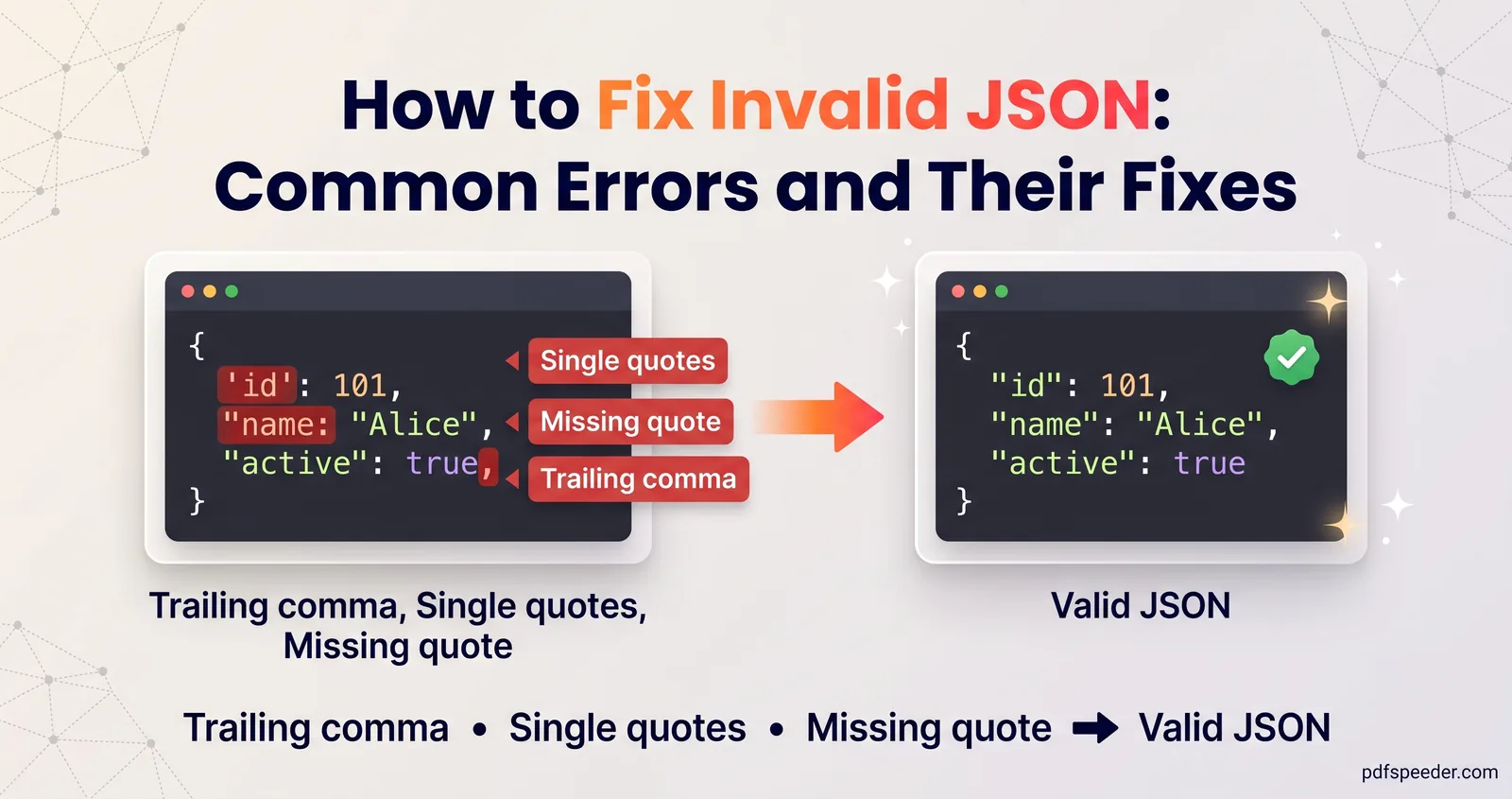
To fix invalid JSON, read the parse error's line and column, go to that exact spot, and look for one of a handful of usual culprits: a trailing comma, single quotes, an unquoted key, a comment, a missing comma or bracket, or an invisible character. JSON's rules, set out in RFC 8259, are stricter than JavaScript's, which is why text that looks fine to you still fails to parse. Each error below comes with the message you're likely to see, a before-and-after fix, and a note on when a one-click repair is safe.
On this page
Fix invalid JSON: read the error message first
Every JSON parse error tells you where the parser gave up. Chrome and Node.js report a character position plus a line and column; Python reports the line, column and character. The spot it names is usually right after the real mistake, so look at that position and the line just before it.
We ran each broken snippet in this guide through Node.js 22, which uses the same V8 engine as Chrome, and through Python 3.13. These are the messages they produced:
| What JavaScript (Chrome, Node) says | What Python says | Usual cause |
|---|---|---|
| Expected double-quoted property name | Illegal trailing comma before end of object | A comma before the closing brace |
| Expected property name or '}' | Expecting property name enclosed in double quotes | Single quotes or an unquoted key |
| Expected ',' or '}' after property value | Expecting ',' delimiter | A missing comma or a comment |
| Unexpected token 'N' (or 'u', or 'T') | Expecting value | undefined, True or TRUE; NaN fails in JavaScript only |
| Bad escaped character | Invalid \escape | A single backslash, as in a Windows path |
| Unexpected non-whitespace character after JSON | Extra data | Two JSON values back to back |
| Unexpected token followed by an invisible character | Unexpected UTF-8 BOM | A byte order mark at the start |
Firefox, Safari and older versions of Chrome word these differently, but the position works the same way everywhere. "Unexpected token" in JSON simply means the parser met a character that isn't allowed at that point.
Commas, quotes and keys
Trailing commas
A JSON trailing comma is the most common error of all, because JavaScript itself allows one:
{
  "name": "Asha",
  "age": 31,
}
Node reports "Expected double-quoted property name in JSON at position 33 (line 4 column 1)", pointing at the closing brace on the line after the real mistake. Python is clearer: "Illegal trailing comma before end of object: line 3 column 12". The fix is to delete the comma after 31. Arrays fail the same way: [1, 2, 3,] gives "Unexpected token ']'".
Single quotes and unquoted keys
JSON strings and property names must use double quotes, and keys must always be quoted:
Before: {'name': 'Asha'}   or   {name: "Asha"}
After:  {"name": "Asha"}
Both of these usually come from JavaScript object literals pasted as if they were JSON. A close relative is a Python dictionary printed with print(data) instead of converted with json.dumps(data): {'ok': True, 'value': None} has single quotes, True and None, and the JSON is {"ok": true, "value": null}. The real fix is to serialise with json.dumps at the source.
Watch for curly "smart" quotes, too. Notes apps, Word and many chat apps turn "name" into “name”, which no parser accepts; replace them with straight quotes and paste code into a code editor rather than a word processor.
Missing commas, capitals and leading zeros
Before: {"name": "Asha"
         "age": 31}
After:  {"name": "Asha",
         "age": 31}
The error points at the start of "age", the first thing that can't follow a value without a comma. A leading zero fails too: "pin": 007 gives "Unexpected number" in Node and "Expecting ',' delimiter" in Python, and must be written as a string ("007") or as 7. Literal names are case-sensitive: RFC 8259 says true, false and null must be lowercase, so TRUE and True fail.
Comments and other things JSON doesn't allow
Comments. JSON has no comments at all, neither // nor /* */. A line like "debug": true // turn off in production fails with "Expected ',' or '}' after property value". Delete the comment, or keep the note as data in a field such as "_comment".
NaN, Infinity and undefined. RFC 8259 says numeric values such as Infinity and NaN "are not permitted", and undefined isn't a JSON value either. Use null instead, or a string such as "NaN" if the meaning matters. Where these come from is worth knowing:
- JavaScript's
JSON.stringifywritesnullforNaNandInfinityand leaves out properties whose value isundefined, so it rarely produces invalid JSON. - Python's
json.dumpswritesNaNandInfinityby default, andjson.loadsaccepts them, so a file can work in Python and fail everywhere else. The Python documentation explains thatallow_nan=Falseraises an error instead.
Single backslashes. Inside a string, a backslash starts an escape sequence, so "C:\Users\asha" fails with "Bad escaped character". Double every backslash: "C:\\Users\\asha". A raw line break inside a string is invalid for the same reason; write it as \n.
Missing brackets and invisible characters
Missing brackets
An unclosed bracket is often reported far from where it's missing, at the end of the file or at the next key:
Before: {"items": [1, 2, 3
        }
After:  {"items": [1, 2, 3]
        }
Node says "Expected ',' or ']' after array element", pointing at the brace on line 3. Formatting the JSON with indentation makes the broken nesting visible: the block that sits at the wrong depth is where the bracket is missing. No tool can safely guess where a bracket belongs, so this one is always a manual fix.
Invisible characters and byte order marks
Some errors point at a spot that looks perfectly fine. That's usually an invisible character:
- A byte order mark (BOM) is a hidden character at the very start of the file, added by some editors when saving as "UTF-8 with BOM". RFC 8259 says software must not add one to JSON sent over a network, and that parsers may ignore it, but neither of the parsers we tested did. Re-save the file as plain UTF-8, or in Python open it with
encoding="utf-8-sig". - Non-breaking and zero-width spaces sneak in when JSON is copied from web pages, PDFs and chat apps. Node showed a non-breaking space as "Unexpected token ' '", which looks exactly like a normal space.
Our Remove Extra Spaces tool removes zero-width characters and BOMs and turns non-breaking spaces into ordinary ones. For JSON, choose Keep indentation, which leaves your indentation and the spacing inside your strings alone, and tick Show me the invisible characters under More options to see what was there. It runs in your browser.
Big numbers that change when parsed
This error doesn't announce itself. JavaScript stores every number as a 64-bit floating-point value, so whole numbers are only exact up to Number.MAX_SAFE_INTEGER, which is 9,007,199,254,740,991 (2^53 − 1). Beyond that, JSON.parse silently rounds:
JSON.parse('{"id": 12345678901234567890}')  →  {"id": 12345678901234567000}
JSON.parse('{"id": 9007199254740993}')      →  {"id": 9007199254740992}
No error, just a different ID. Python keeps both numbers exact, so the same file can behave differently in two languages. RFC 8259 notes that only integers between −(2^53 − 1) and 2^53 − 1 are interoperable, meaning every implementation agrees on their value. The reliable fix is to send large IDs as strings: "id": "12345678901234567890".
Duplicate keys are the other silent problem. RFC 8259 says names "SHOULD be unique", but {"a": 1, "a": 2} parses without complaint in both JavaScript and Python, which simply keep the last value.
Validate, repair and format in one place
Our JSON Formatter is a JSON validator built for these cases, and it runs entirely in your browser, so nothing you paste is sent to a server:
- Paste your JSON. It's checked as you type, and an error shows its line and column with a caret under the exact character.
- Fix it by hand, or select Repair. Repair rewrites the input as strict JSON, removing comments and trailing commas, and converting single quotes and unquoted keys. Lenient parse formats that kind of near-JSON without rewriting your input.
- Read the warnings. Duplicate keys are listed by name and line instead of disappearing.
- Format or minify. Choose 2 spaces, 4 spaces or tabs, sort keys if you like, open the tree view, then copy the result or download it as
data.json.
It parses with its own engine rather than JSON.parse, so big numbers keep every digit and keys stay in their original order. That makes it a safe place to format JSON online when the data contains long IDs.
Warning: Repair can change values as well as punctuation. It writes NaN and Infinity as null, keeps a stray backslash as a literal backslash (so "C:\Users\asha" becomes "C:\\Users\\asha"), and rewrites numbers such as .5, +1 and 007 as 0.5, 1 and 7. It lists these changes under Repaired, so check that list against your data before you use the result.
Once the JSON is valid, JSON to PDF can turn it into a readable document: syntax-highlighted, as a tree, or as a table for an array of records. It accepts files up to 25 MB, processes them on our server, and counts as one task in the free daily allowance (2 tasks a day without an account, 3 with a free account). Our guide to converting documents to PDF covers the other file types.
Next step: paste your broken JSON into the JSON Formatter, jump to the line and column it reports, and fix the cause from the table at the top before reaching for Repair.
Frequently asked questions
What does "Unexpected token" mean in a JSON parse error?
The parser found a character that isn't allowed at that position, such as a quote of the wrong kind, a comma before a closing bracket, NaN, undefined or an invisible character. Go to the position in the message and check the character there and just before it.
Can JSON files contain comments?
No. Standard JSON has no comment syntax, so remove // and /* */ comments or move the notes into a regular field such as "_comment".
Are trailing commas allowed in JSON?
No. A comma after the last item in an object or array makes the whole document invalid, even though JavaScript code accepts it.
Why did my large ID change after parsing the JSON?
JavaScript can only represent whole numbers exactly up to 9,007,199,254,740,991. Larger numbers are rounded without an error, so send them as strings instead.
Is it safe to paste API responses into an online JSON validator?
Our JSON Formatter runs entirely in your browser, so the data isn't uploaded. Still, avoid pasting live passwords or keys anywhere you don't need to.